> ## Documentation Index
> Fetch the complete documentation index at: https://help.get-ryze.ai/llms.txt
> Use this file to discover all available pages before exploring further.
# Agent Context
> The brand context every Ryze agent reads on every turn — shape what the AI writes about you, how it sounds, and what it links to.
Everything Ryze produces — programmatic articles, on-page copy, off-page mentions, ad creatives, reports — is shaped by one place: your **Brand** context. It's the brief the agents read on every turn. Get it right and every output sounds like you, sells what you actually sell, and points at the pages and sources you care about.
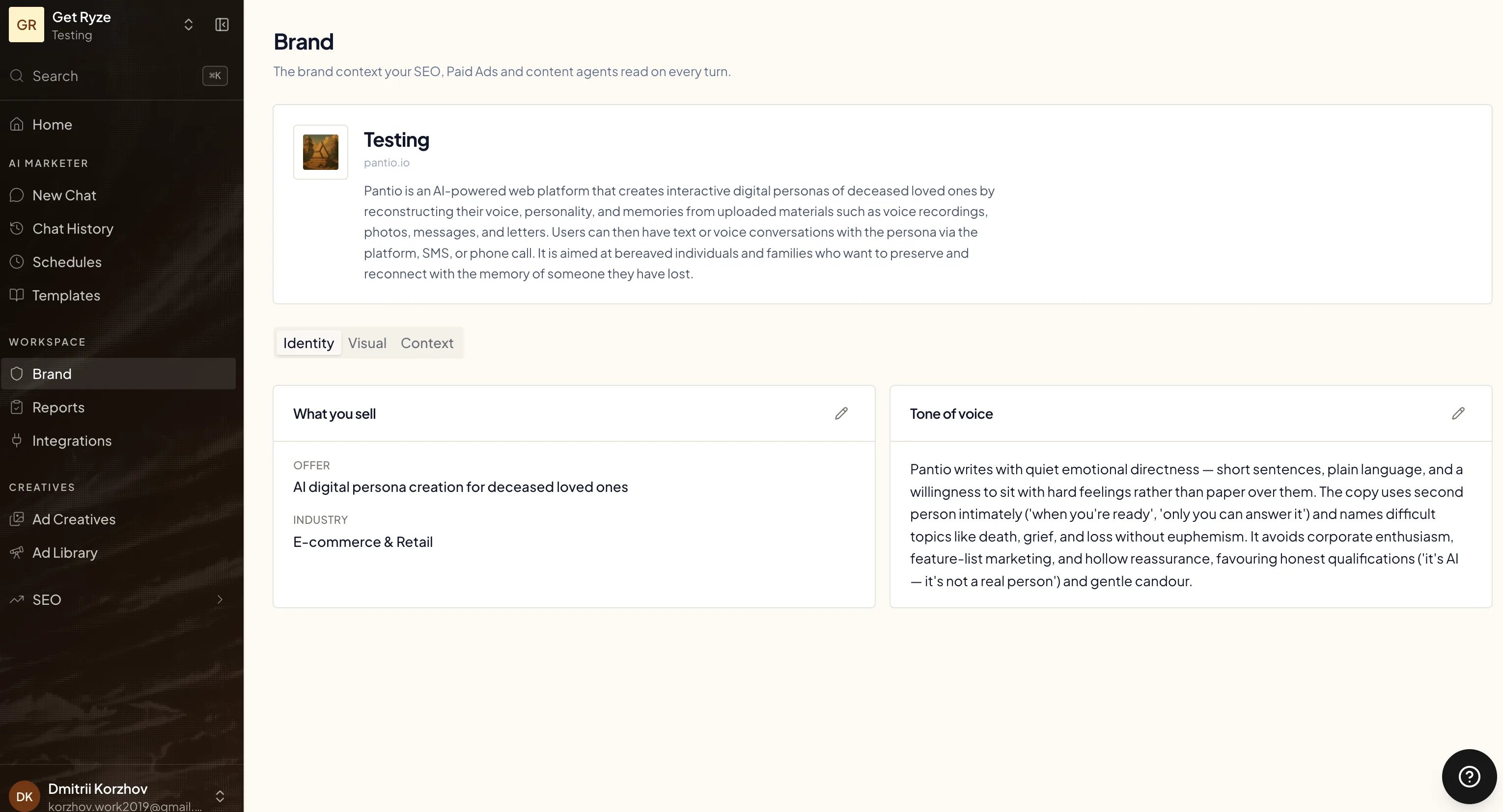
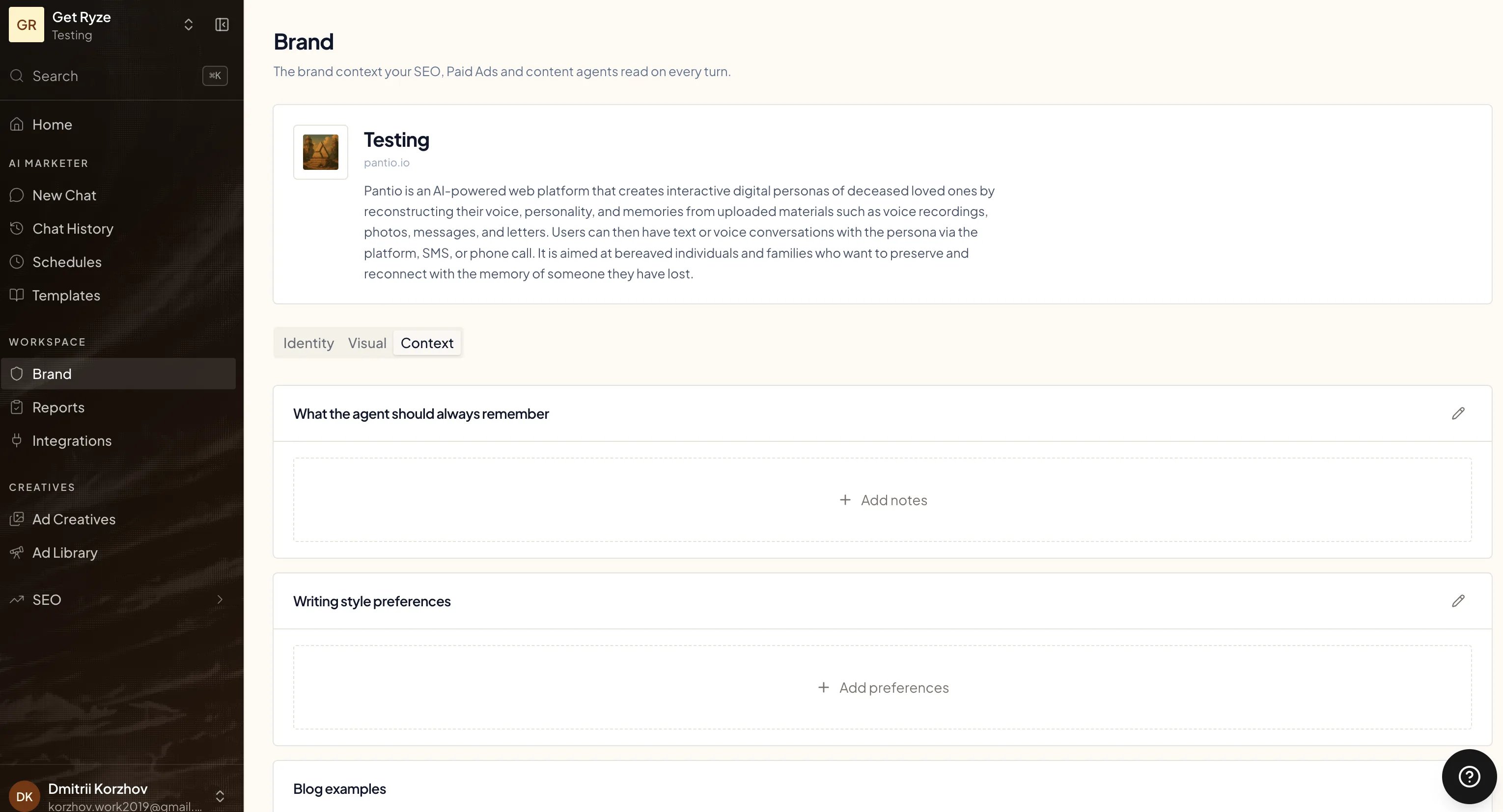
Find it under **Brand** in the workspace sidebar. It's split into three tabs: **Identity**, **Visual**, and **Context**.
 ## Rules for every agent
These apply to everything the agent does, across SEO, paid ads, and content.
### Identity — what you sell and how you sound
* **What you sell.** A short description of your offer, plus your **industry**. This anchors topic planning, keyword relevance, and the angle of every piece — so a deceased-loved-one persona platform never gets written up like a generic SaaS.
* **Tone of voice.** How the writing should feel. Be specific and prescriptive — the agent follows this literally. For example: *"Writes with quiet emotional directness — short sentences, plain language, a willingness to sit with hard feelings rather than paper over them. Avoids corporate enthusiasm, feature-list marketing, and hollow superlatives."*
The more concrete the tone, the less generic the output. Vague tone ("professional, friendly") gives you vague, average copy.
### What the agent should always remember
Free-form notes the agent reads before doing anything. This is your lever for facts, claims, and guardrails:
## Rules for every agent
These apply to everything the agent does, across SEO, paid ads, and content.
### Identity — what you sell and how you sound
* **What you sell.** A short description of your offer, plus your **industry**. This anchors topic planning, keyword relevance, and the angle of every piece — so a deceased-loved-one persona platform never gets written up like a generic SaaS.
* **Tone of voice.** How the writing should feel. Be specific and prescriptive — the agent follows this literally. For example: *"Writes with quiet emotional directness — short sentences, plain language, a willingness to sit with hard feelings rather than paper over them. Avoids corporate enthusiasm, feature-list marketing, and hollow superlatives."*
The more concrete the tone, the less generic the output. Vague tone ("professional, friendly") gives you vague, average copy.
### What the agent should always remember
Free-form notes the agent reads before doing anything. This is your lever for facts, claims, and guardrails:
 * Hard facts about your product, pricing, and positioning the AI must get right.
* Claims you *can* make and ones you **must not** (legal, medical, compliance).
* Differentiators and proof points you want surfaced.
* Competitors or comparisons to avoid.
### Writing style preferences
Finer-grained rules than tone of voice — the mechanics of how a sentence is built. Things like: short paragraphs, no em dashes, British spelling, never start with "In today's world", always use active voice. The agent applies these to every draft.
## Rules for programmatic articles and blog
These blocks steer the content engine specifically.
### Blog examples
Paste a few URLs or excerpts of writing you want the agent to emulate — your best existing posts, or a competitor's tone you admire. The agent uses them as a stylistic reference, matching structure and rhythm rather than copying.
### External references (pSEO)
Programmatic articles and off-page mentions naturally cite and link out to sources. You steer that in the "always remember" notes:
* **Name the sources you want cited** — industry reports, your own research, authoritative sites in your space.
* **Name what to avoid** — competitors you don't want to send link equity to, low-quality sources, anything off-brand.
* **Point at your own pages.** Programmatic articles anchor internal links to your own key pages — drawn automatically from your store and Search Console. Context shapes the *external* references; your real pages shape the *internal* ones.
## Rules for creatives
The **Visual** tab holds your brand assets — logo and product photos the agent feeds into every ad creative it generates. See [AI Ad Creatives](/paid-ads/ai-creatives) for how they're used.
## Why it matters
The agents run on this context every single turn — there's no separate "settings" they forget. Edit the Brand page once and the change shows up in the next article, the next optimization, the next creative. It's the highest-leverage place in Ryze: a few minutes here changes everything downstream.
Brand context is per-workspace. If you run [multiple workspaces](/workspaces/create-workspace), each one carries its own identity, tone, and notes — so a single account can serve very different brands without bleed-over.
## Related
See the context turned into full, published drafts.
Improvements the agent proposes on its own.
* Hard facts about your product, pricing, and positioning the AI must get right.
* Claims you *can* make and ones you **must not** (legal, medical, compliance).
* Differentiators and proof points you want surfaced.
* Competitors or comparisons to avoid.
### Writing style preferences
Finer-grained rules than tone of voice — the mechanics of how a sentence is built. Things like: short paragraphs, no em dashes, British spelling, never start with "In today's world", always use active voice. The agent applies these to every draft.
## Rules for programmatic articles and blog
These blocks steer the content engine specifically.
### Blog examples
Paste a few URLs or excerpts of writing you want the agent to emulate — your best existing posts, or a competitor's tone you admire. The agent uses them as a stylistic reference, matching structure and rhythm rather than copying.
### External references (pSEO)
Programmatic articles and off-page mentions naturally cite and link out to sources. You steer that in the "always remember" notes:
* **Name the sources you want cited** — industry reports, your own research, authoritative sites in your space.
* **Name what to avoid** — competitors you don't want to send link equity to, low-quality sources, anything off-brand.
* **Point at your own pages.** Programmatic articles anchor internal links to your own key pages — drawn automatically from your store and Search Console. Context shapes the *external* references; your real pages shape the *internal* ones.
## Rules for creatives
The **Visual** tab holds your brand assets — logo and product photos the agent feeds into every ad creative it generates. See [AI Ad Creatives](/paid-ads/ai-creatives) for how they're used.
## Why it matters
The agents run on this context every single turn — there's no separate "settings" they forget. Edit the Brand page once and the change shows up in the next article, the next optimization, the next creative. It's the highest-leverage place in Ryze: a few minutes here changes everything downstream.
Brand context is per-workspace. If you run [multiple workspaces](/workspaces/create-workspace), each one carries its own identity, tone, and notes — so a single account can serve very different brands without bleed-over.
## Related
See the context turned into full, published drafts.
Improvements the agent proposes on its own.